Save, Restore & Profile
your window positions
in Windows 10/11
Tired of rearranging windows every time you restart? PositionPro remembers where they go — and lets you switch between saved desktop layouts in a click.

Try PositionPro with a fully functional 7-day free trial before you buy.
Choose “Free trial” in the Microsoft Store.
Manage your desktop layout the easy way.
PositionPro works with the Windows API to remember where each application's window goes. When a window opens, it's moved to its saved coordinates. When you switch profiles, any saved app that isn't running is opened, and every window moves to its saved position.
It handles maximised and minimised states, multi-monitor setups, and monitor hot-plugging. Configuration is stored locally in JSON — no cloud, no sync, no account.
Per-application position saving
Each application's window coordinates, size, and state (normal, maximised, minimised) are saved independently per profile.
Profile-based workspace launching
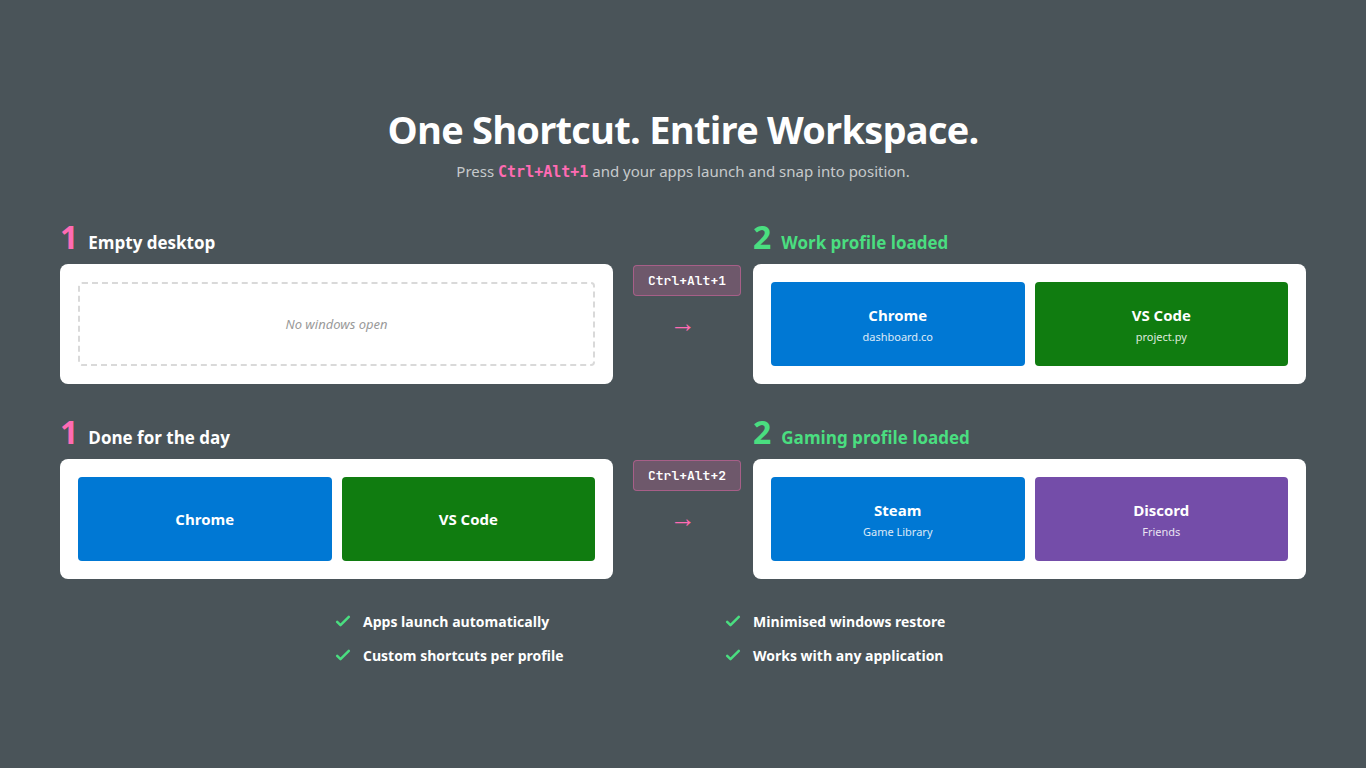
Profiles store both positions and application paths. Switching a profile launches missing apps and restores all window positions.
Automatic monitor detection
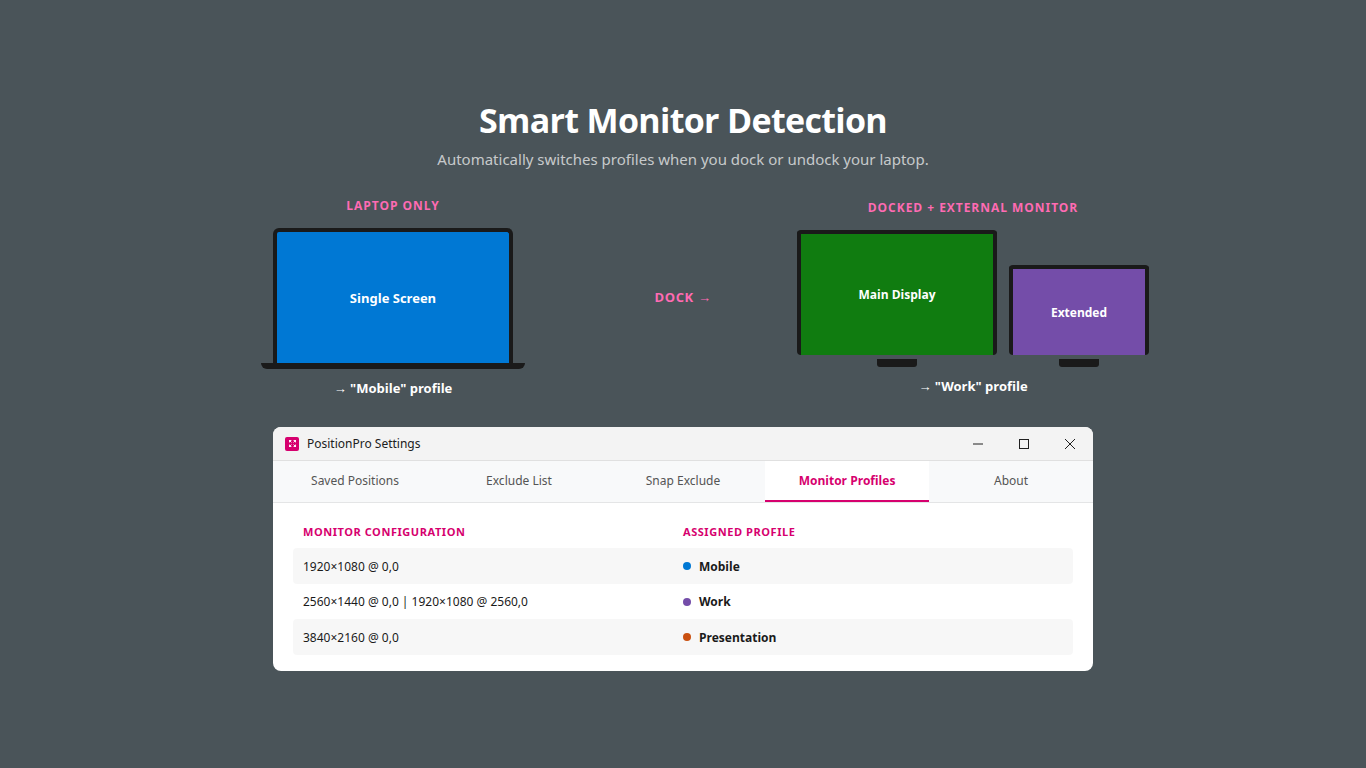
Detects display configuration changes and switches to the matching profile. Laptop undocked? Different layout applied automatically.
Snap layouts with auto-fill
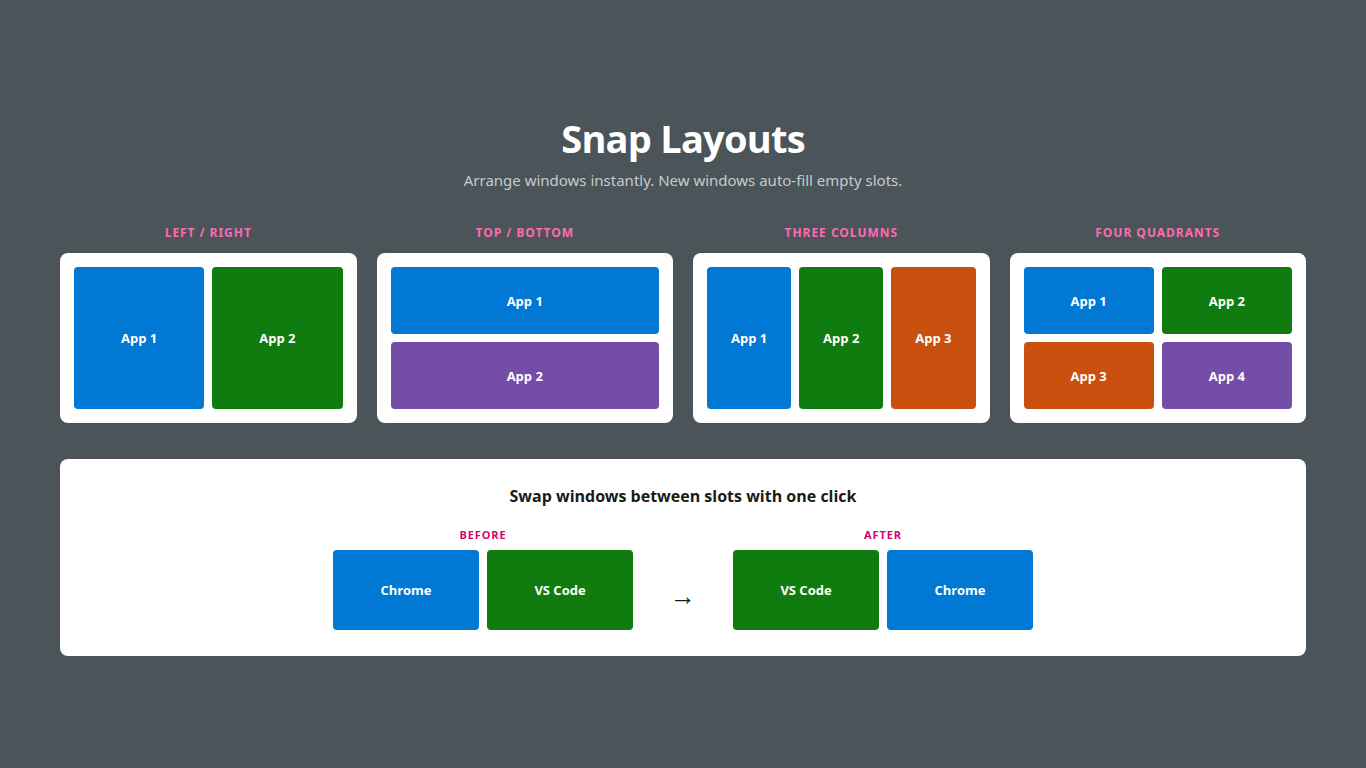
Built-in tiling: side-by-side, stacked, columns, quadrants. New windows auto-fill empty slots in the active snap layout.
The full feature set.
Multiple Profiles
Store separate layouts for different workflows. Each profile saves its own set of window positions and application paths.
App Launching
Switching profiles launches any apps that aren't already running and moves them to their saved positions once loaded.
Snap Layouts
Side-by-side, stacked, three columns, or quadrants. New windows auto-fill empty slots. Swap windows between positions.
Monitor Detection
Registers for display change events and automatically applies the profile matching your current monitor configuration.
Global Hotkeys
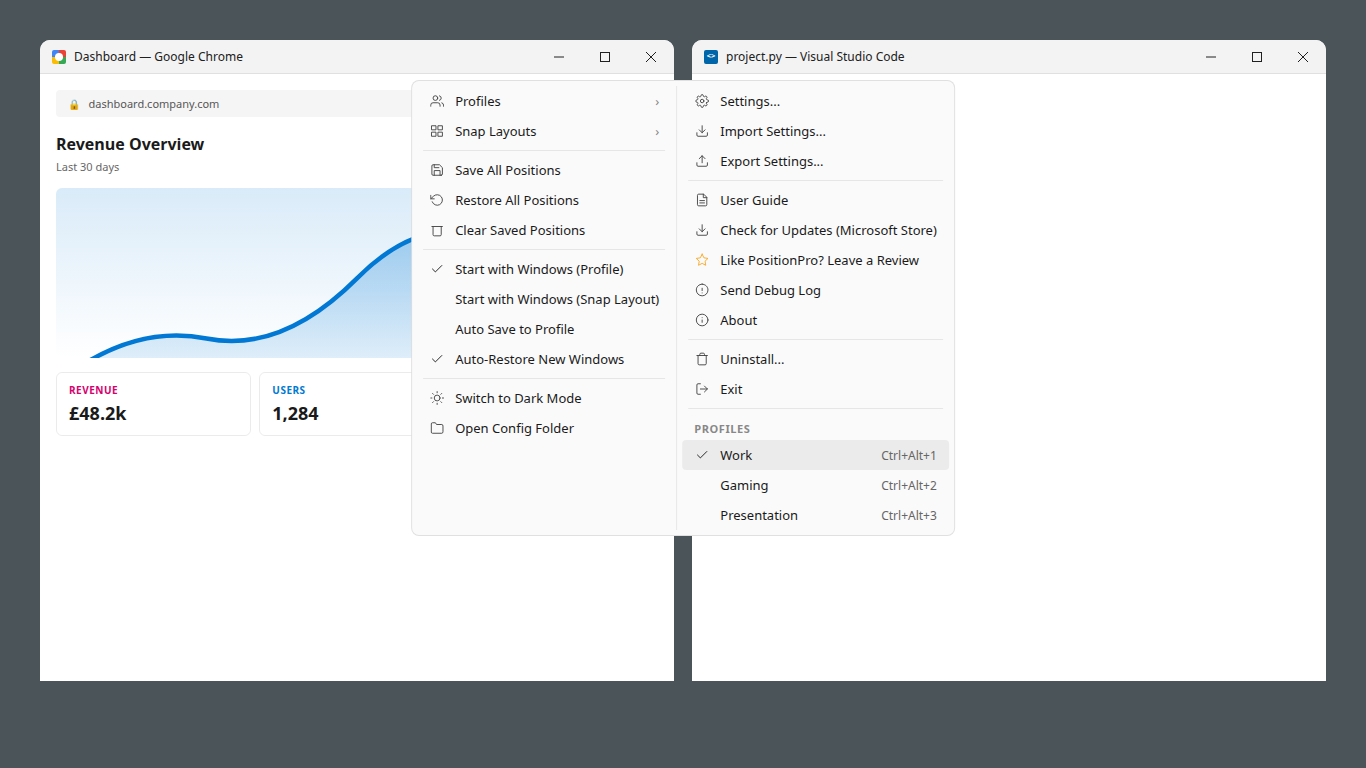
Ctrl+Alt+S to save, Ctrl+Alt+R to restore. Ctrl+Alt+1 through 9 to switch profiles directly. Disable them all from the tray menu in one tick if they clash with AZERTY, QWERTZ, or other non-US keyboard layouts.
Lightweight
System tray app. Minimal memory footprint. No network calls of its own, no analytics, no cloud sync. Local JSON config only.
Import & Export
Export all profiles and settings to a single file. Import on another machine. Useful for backup or migrating to new hardware.
Exclude List
An app you'd rather place yourself? Add it to the exclude list and PositionPro will ignore it entirely. To keep one full screen while the others are split, add it to Snap Exclude instead.
Auto-Restore
New windows automatically move to their last saved position when they open. Toggle on or off from the system tray menu.
Startup Profile
Choose which profile loads automatically when PositionPro starts. It opens the profile's saved apps and puts every window back where it belongs.
Auto-Start
Optionally starts with Windows. Runs quietly in the system tray with zero user interaction required after initial setup.
Updates
Check for updates manually at the Microsoft Store. PositionPro makes no background network connections of its own.
See it in action.
Try it for yourself: build a profile for each workflow, or snap windows into place with a click.
Three steps. Under a minute.
Install
Install from the Microsoft Store. No other software needed.
Arrange
Position your windows where you want them, then press Ctrl+Alt+S to save the layout.
Done
Windows now restore to saved positions automatically when opened. That's it.
Keyboard control.
One price. No subscription.
PositionPro
Windows 10 & 11
One-time payment
- All features included
- Multi-monitor auto-detection
- Snap layouts, profiles & hotkeys
- Auto-restore & startup profiles
- Updates included
Choose “Free trial” in the Microsoft Store.

Secure checkout via Microsoft Store
Refund requests are decided by Microsoft
Frequently asked questions.
What does PositionPro do?
PositionPro saves and restores window positions on Windows 10 and 11. Once you've saved your layout, each application's window returns to its saved position when you reopen it. You can also create multiple desktop profiles for different workflows and switch between them with a single hotkey.
Can I try it for free?
Yes, and we strongly suggest it. PositionPro’s 7-day free trial is fully functional, giving you time to make sure it works with your apps and your monitor setup before you buy.
What happens when the free trial ends?
PositionPro stops arranging your windows and offers you the chance to buy it. Your saved layouts are kept, so once you've bought it, everything carries on as before.
Is it a subscription?
No. PositionPro is a one-time purchase of $9.99 from the Microsoft Store. There are no recurring fees, no subscriptions, and no in-app purchases. Updates are free for as long as PositionPro is maintained.
Does it work with multiple monitors?
Yes. PositionPro detects your monitor configuration and can automatically switch to the correct profile when you dock or undock your laptop. Each monitor setup can have its own saved profile that activates automatically.
Does it work with every app?
We can't guarantee that. PositionPro works with most desktop apps, but not every single one. Built-in Windows apps such as Settings and Calculator are left alone by design. Apps that run with administrator privileges can't be moved by PositionPro either, because Windows doesn't allow it. That's why we suggest using the fully functional 7-day free trial to make sure it works with your apps before you buy.
Can it remember two windows of the same app?
No. PositionPro saves one position per app.
Does it need an internet connection?
Only once: the first time you start PositionPro, you need an internet connection to read the Licence Agreement before agreeing. After that it works entirely offline and makes no network connections of its own. To check that your free trial or purchase is active, it asks Windows, which checks your Microsoft Store licence. All settings and profiles are stored locally on your computer in simple JSON files. You can check for updates manually via the Microsoft Store.
Is there a standalone or offline version?
No. PositionPro is purchased, delivered, licensed and updated through the Microsoft Store only. There is no other way to download or install it.
Is it safe to install?
Yes. PositionPro is distributed only through the Microsoft Store. Microsoft checks and signs every version before it is released.
What happens to my windows after a restart?
Turn on Start with Windows in the tray menu and PositionPro will put your windows back every time you sign in. Choose Start with Windows (Profile) to load your startup profile, opening its saved apps and putting every window back in its saved position, or Start with Windows (Snap Layout) to bring back your snap layout, including any locked slots.
Can I use it on multiple PCs?
Your Microsoft Store purchase covers up to 10 PCs signed in with the same Microsoft account. You can also export your settings and profiles from one machine and import them on another.
What happens to my settings if I uninstall?
Windows deletes your PositionPro settings and profiles when you uninstall it. If you want to keep your settings and profiles, use Export Settings in the PositionPro tray menu before uninstalling.
Is it available in other languages?
No. PositionPro is available in English only at the moment. This feature is in our Product Backlog.
Can I get a receipt?
Yes. Microsoft issues it. In your Microsoft account's order history, open Order details to print a receipt, or download a tax invoice where Microsoft offers one.
Can I get a refund?
Not necessarily. Refunds for Microsoft Store purchases are decided by Microsoft, not by us. Microsoft's terms treat app purchases as final and non-refundable unless the law says otherwise, so Microsoft may decline the refund request. For this reason, we strongly suggest that you use the fully functional 7-day free trial before purchase to ensure that PositionPro works with your apps and your monitor setup. Your statutory rights are unaffected.